TikTok LIVE Sound Settings: How to Mix Game Audio, Music and Your Voice
In short
You control a game’s sound in a TikTok LIVE in two places: in the game’s Control Center and on the source in LIVE Studio or OBS. Your voice should always sit clearly above the game audio. If viewers hear nothing, one of the two controls is at zero. An echo happens when two sources pick up the same sound.
- Two controls: the game’s Control Center and the source in your streaming app.
- Voice before game: in OBS, −15 to −20 dB for the game is usually enough.
- Echo or double audio: mute one source.
- Before going live, speak once while triggering an action.
Contents
Where do you set the game audio?
An interactive game’s sound passes through two stations. First, the game itself decides how loud music and effects are. On TikArena you set that in the Control Center. Then your streaming app picks up the sound and mixes it with your microphone. If either station is muted, your viewers hear nothing.
| Where | What you set there |
|---|---|
| The game’s Control Center | Volume of game sound and music |
| Link source in LIVE Studio | Source audio on or off, volume |
| Browser source in OBS | “Control audio via OBS”, then the track in the audio mixer |
| Microphone | Your voice, always louder than the game |
Sound in TikTok LIVE Studio
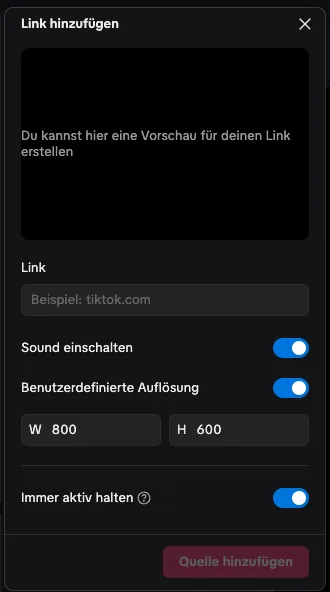
When you add the game as a link source, make sure the source’s sound is on in the “Add link” window. You then adjust the volume in LIVE Studio directly on the source. If you capture the game with window capture, the game audio comes through your computer’s system sound, depending on your settings. Check that it only arrives once.
Sound in OBS
Turn on “Control audio via OBS” in the browser source. The game then shows up in the audio mixer as its own track. Set it so your voice sits clearly above it, usually −15 to −20 dB for the game is enough. More on the setup is in TikTok Live Games in OBS.
Mixing voice and game
Your viewers stay for you, not for the music. So keep the game clearly quieter than your voice. Loud effects like explosions or cheering may stand out briefly, the background music should not. Do a short test before every LIVE: talk normally and trigger an action in the simulator. You should understand every word.
Common sound problems
| Problem | Cause | Fix |
|---|---|---|
| No game sound | Control in the Control Center or on the source at zero | Check both controls |
| Double audio or echo | Two sources pick up the same sound | Mute one source |
| Game drowns out your voice | Game track too loud | Turn the game down, check the microphone |
| Sound lags behind the picture | High load on your computer | Close other programs, lower settings |
Other picture and sound issues are solved in Fixing TikTok LIVE Studio Problems.
Games for your LIVE


Frequently asked questions
How do I set up sound in a TikTok LIVE?
In two places: in the game’s Control Center and on the source in LIVE Studio or OBS. Your voice should always be louder than the game.
Why can’t my viewers hear the game sound?
One of the two controls is at zero or the source’s sound is off. Check the Control Center and the source.
How loud should the game sound be?
Clearly quieter than your voice. In OBS, −15 to −20 dB for the game is usually enough.
Where does the echo in my stream come from?
Two sources pick up the same sound, for example the link source plus system sound. Mute one of them.